FrameDrop is an encrypted photo messenger for iPhone and Android. Photos from the people you love appear on your home screen widget and on e-ink picture frames — right where you'll see them.
iPhone with iOS 17 or later · Android 12 or later · build your own photo frame
Three steps to photos that feel like home.
Snap or pick up to three photos and send them to someone you love. They're encrypted before they leave your phone.
The photo shows up on their home screen and on their picture frame — no need to open any app.
Every glance at your phone or your shelf reminds you of the people who matter most.
More than a messenger — a living photo frame for the people you care about.
Photos appear directly on the home screen widget — on iPhone and Android. No opening the app, no scrolling through chats. Just a glance and you're connected.
Make it yours. Filter by chat or contact, enable automatic slideshows, and place multiple widgets — or frames — for different people.
Every photo and message is end-to-end encrypted with the Signal Protocol. Your moments stay between you and the people you choose.
Turn an e-ink display into a FrameDrop photo frame for your shelf, your desk or your grandparents' living room. It fetches new photos by itself over Wi-Fi — no phone, no app, nothing to tap.
Buy one of these ready-made boards and install the open-source FrameDrop firmware — no soldering needed.
7.3" E Ink Spectra 6 color display, 800×480, buttons, battery-powered.
7.3" E Ink Spectra 6 color display, 800×480, battery-powered.
7" 1024×600 color LCD with touch, always on, powered over USB.
Order one of the boards above from the manufacturer or a reseller.
Connect the device to a computer with a USB cable and open the FrameDrop web installer in Chrome or Edge. It flashes the firmware in a few clicks — no tools to install.
Open the web installerIn FrameDrop, open Settings → Photo frames → Add frame. Your phone connects to the frame over Bluetooth and hands over the Wi-Fi details. Then pick the chats it should show.
FrameDrop uses the same battle-tested cryptography that protects billions of messages worldwide. And because it's open source, you don't have to take our word for it.
Free, open source, and the same encrypted chats on every platform.
Prefer to stay off the Play Store? Get FrameDrop through our F-Droid repository — no Google account required.
Download F-Droid from f-droid.org — the free and open-source app store for Android.
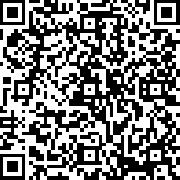
Scan the QR code below or manually add the repository URL in F-Droid settings:
https://fdroid.geheimnachrichtendienst.de/
Long-press to copy, then paste in F-Droid → Settings → Repositories → Add
Search for "FrameDrop" in F-Droid and install. Updates arrive automatically — privacy-friendly, no Play Store needed.
Download FrameDrop and turn your home screen — and your shelf — into a living photo frame.